
It's 2026, and we have officially moved past the experimental phase of artificial intelligence (AI) in live broadcasting. It's no longer about just having a bot read your chat; it's about having a full, invisible production crew running your show while you focus on being the talent.
The landscape of livestreaming in 2026 has undergone a fundamental shift from manual operation to content orchestration. For years, the barrier to high-production value was the cognitive load of managing scenes, monitoring audio levels, and engaging with chat simultaneously.
Today, the invisible crew meta has matured, allowing solo content creators to deploy sophisticated AI-driven directors and audio engineers that live within their GPUs. This transition enables them to move away from the physical tether of a Stream Deck and instead maintain what we can call "executive presence" — the ability to focus entirely on performance while the software handles the cinematic delivery.

By integrating the latest advancements in neural network processing and native WebSocket integration, streamers can now achieve a level of polish previously reserved for multi-person broadcast teams. Whether it's an AI that understands the emotional intent of a camera cut or a frequency-based leveling system that ensures perfect vocal clarity in a chaotic game environment, automation is no longer about replacing the human element — it is about amplifying it.
If we're looking at the landscape as of early February 2026, here's a breakdown of the heavy hitters for automation.
AI camera switching: The virtual director
The dream of a multi-camera setup without a physical producer is finally real. The goal here is speaker-tracking — having the software "know" who is talking and which angle is the most cinematic at any given moment.
- YourDirectorAI (v1.3+): This has become the go-to for OBS power users. It's an AI-driven switcher that uses neural networks to detect faces and "intent". It doesn't just switch when you talk; it recognizes if you're looking at a different monitor or if a guest is laughing, making the cuts feel human rather than mechanical.
- vMix 29 (Pro): For the high-end broadcasters, vMix remains the king. Its 2026 updates include a "Smart Cut" feature that uses NDI metadata to coordinate switching across dozens of inputs with sub-20ms latency.
- Advanced Scene Switcher (OBS Plugin): It's the "Old Reliable" that got a massive 2025/2026 overhaul. You can now set up complex macros where the AI monitors your gameplay and your facial expressions to decide when to move from "Game View" to "Facecam."
AI audio leveling: The auto-engineer
Nothing kills a broadcast faster than "peaking" audio or a quiet guest. In 2026, we've moved from simple compressors to predictive leveling.
- Waves Vocal Rider & Clarity Vx Pro: These are the gold standard for livestreams. Clarity Vx uses AI to strip away room noise (and even your mechanical keyboard) in real-time, while Vocal Rider acts as an invisible hand on the fader, keeping your voice at the perfect volume without the "squashed" sound of a heavy limiter.
- Sonarworks SoundID VoiceAI: A newcomer to the live space this year. It applies studio-grade vocal "toning" in real-time. If you're streaming in a bedroom, it can make your mic sound like it's in a treated vocal booth by remodeling the audio signal on the fly.
- NVIDIA Broadcast (2026 Edition): If you have an RTX card, this is still the most accessible tool. Its "Room Echo Removal" and "Eye Contact" features are now standard, but the 2026 update added Auto-Ducking 2.0, which uses AI to lower game audio perfectly under your voice based on the frequency of your speech, not just the volume.
For those looking at how to go about setting these components up, the guide below provides the technical blueprint for setting up a hands-free, high-fidelity broadcast environment using the premier tools mentioned above in 2026.
Visual orchestration with YourDirectorAI (v1.3)

In 2026, YourDirectorAI has emerged as the definitive plugin for automated camera switching. Unlike legacy timer-based switchers, it uses facial recognition and "intent" logic to decide when to cut to a wide shot or stay on a tight closeup.
Initial configuration
- Hardware link: Ensure you are using OBS Studio 31.0+ to take advantage of the 2026 Hybrid MP4 recording standard and enhanced WebSocket performance.
- The WebSocket handshake: In YourDirectorAI, navigate to the Settings tab and enable Native OBS WebSockets. This allows for zero-latency communication between the AI engine and your scene transitions.
- Defining the logic: Tag Camera 1 (Tight) as the "Primary Speaker" feed and Camera 2 (Wide/Room) as the "Engagement/Reaction" feed. When it comes to the logic threshold, set the "Switching Sensitivity" to 75%. This prevents "jumpy" cuts while ensuring the camera reacts to significant movements or posture shifts (e.g., leaning in for a competitive moment).
The tally feature
Enable the Audio Tally system. In 2026, YourDirectorAI can whisper the active camera into your ear-monitoring feed. This subtle voice prompt ensures you always know which camera is "Live" without ever having to glance at your OBS preview.
Predictive audio leveling and noise isolation

Audio is perhaps the most crucial aspect of the viewing experience. In 2026, we've moved past simple compressors to AI systems that re-model your voice for consistent quality regardless of your environment.
Real-Time Isolation (Waves Clarity Vx Pro)
- The chain: Add Waves StudioRack as a VST3 filter on your Microphone source in OBS.
- The setting: Load Clarity Vx Pro and set the Neural Network to Broad 1 (for single speakers).
- Ambience control: Use the "Reflections" dial at 15%. Unlike older noise suppressors that make you sound like you're in a vacuum, this keeps a hint of natural room depth while stripping away 100% of fan noise and keyboard clicks.
Frequency-based leveling (NVIDIA App 2026)
With the launch of the NVIDIA App (replacing Broadcast), audio leveling is handled by the GPU's Tensor cores.
- Auto-Ducking 2.0: Unlike traditional ducking, which reacts to raw volume, this version analyzes the frequency range of your speech. It will lower the game audio only in the frequencies where your voice lives, creating a "hole" in the mix for your voice to sit in without making the game sound quiet.
- The "SoundID" Profile: If using Sonarworks SoundID, apply a Broadcast profile. This uses AI to correct your specific microphone's frequency response curve in real-time, making a $100 mic sound like a $1,000 professional studio condenser.
The invisible crew workflow integration
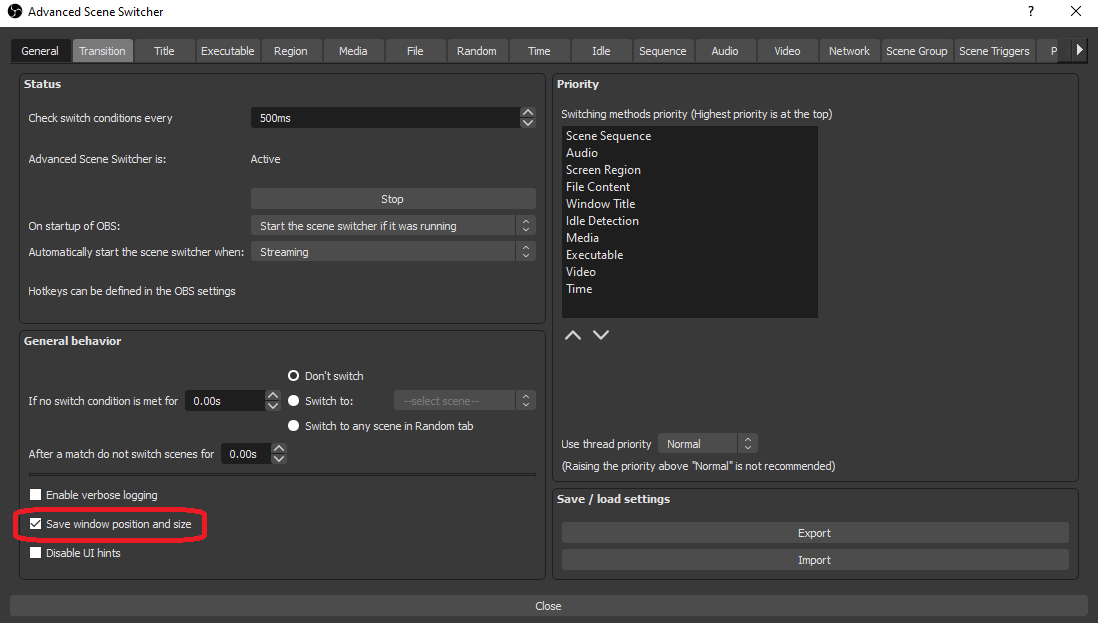
To make the automation truly seamless, you must link your game state to your broadcast behavior. First up, use the Advanced Scene Switcher plugin to monitor your GPU load or game process. Then, move to setting up the automation loop, which can be done as follows:
- Game State: When the game is in "Match" mode, YourDirectorAI takes over and prioritizes "Game + Facecam" scenes.
- Lobby State: When the game ends, the AI detects the lack of intense movement and automatically switches to your "Full Facecam" scene to facilitate chat interaction.
- Emergency Override: Set a "Kill Switch" hotkey that pauses all AI automation. Reliability in 2026 is high, but the human director should always have the final say.
Implementing these automated systems is a significant investment in your brand's longevity and your own mental health as a creator. By offloading the technical minutiae to AI directors and engineers, you reclaim the creative energy that is so often drained by the "multi-tasking tax."
A broadcast that runs itself allows you to take bigger risks, engage in deeper conversations, and ultimately produce content that feels more like a curated television experience than a standard home stream. The goal is to reach a state of flow where the technology disappears entirely, leaving only the connection between you and your community.
As you refine your automated stack, remember that the invisible crew is there to serve your vision, not dictate it. Periodically audit your AI switching logic and audio profiles to ensure they still align with the "vibe" of your channel.
In an era where production quality is becoming standardized through automation, your unique personality and authentic reactions remain the only truly un-replicable assets you possess. Use the tools to clear the path, but make sure you are the one leading the way.
To conclude, the real magic in 2026 isn't just the automation; it's the reliability. Two years ago, these tools would crash your PC. Now, thanks to better GPU optimization (especially on the Blackwell and Ada architectures), you can run a full AI-managed broadcast on a single machine without dropping a single frame.

Esports is a journey where winning is not as important as enjoying the game!
Subscribe to our newsletter.
Latest streaming statistics and analytics news in weekly format!
Subscribe